 by
by 
The first time I opened an options chain, I convinced myself I wasn’t ready to trade yet.
Rows of numbers. Columns I couldn’t name. Bid. Ask. OI. A grid of data that looked more like a spreadsheet from an accounting firm than anything that was supposed to help me make a trade.
I closed the tab and went back to reading about options theory, avoiding getting my hands dirty.
An options chain is the table your brokerage displays showing every available contract for a stock, organized by expiration date, with calls on one side, puts on the other, and strike prices down the middle.
Each row shows a contract’s bid, ask, last trade price, volume, and open interest.
That’s it. Once you know what each column means, the wall of numbers becomes a tool you’ll use for every single trade.
In What Are Stock Options? A Beginner’s Guide, we introduced calls, puts, and the key terminology.
Then, in Understanding Options Contracts: Strike, Expiration, Premium, we unpacked how strike price, expiration, and premium define every contract.
Now we put that knowledge to work on a real screen.
Table Of Contents
What Is an Options Chain?
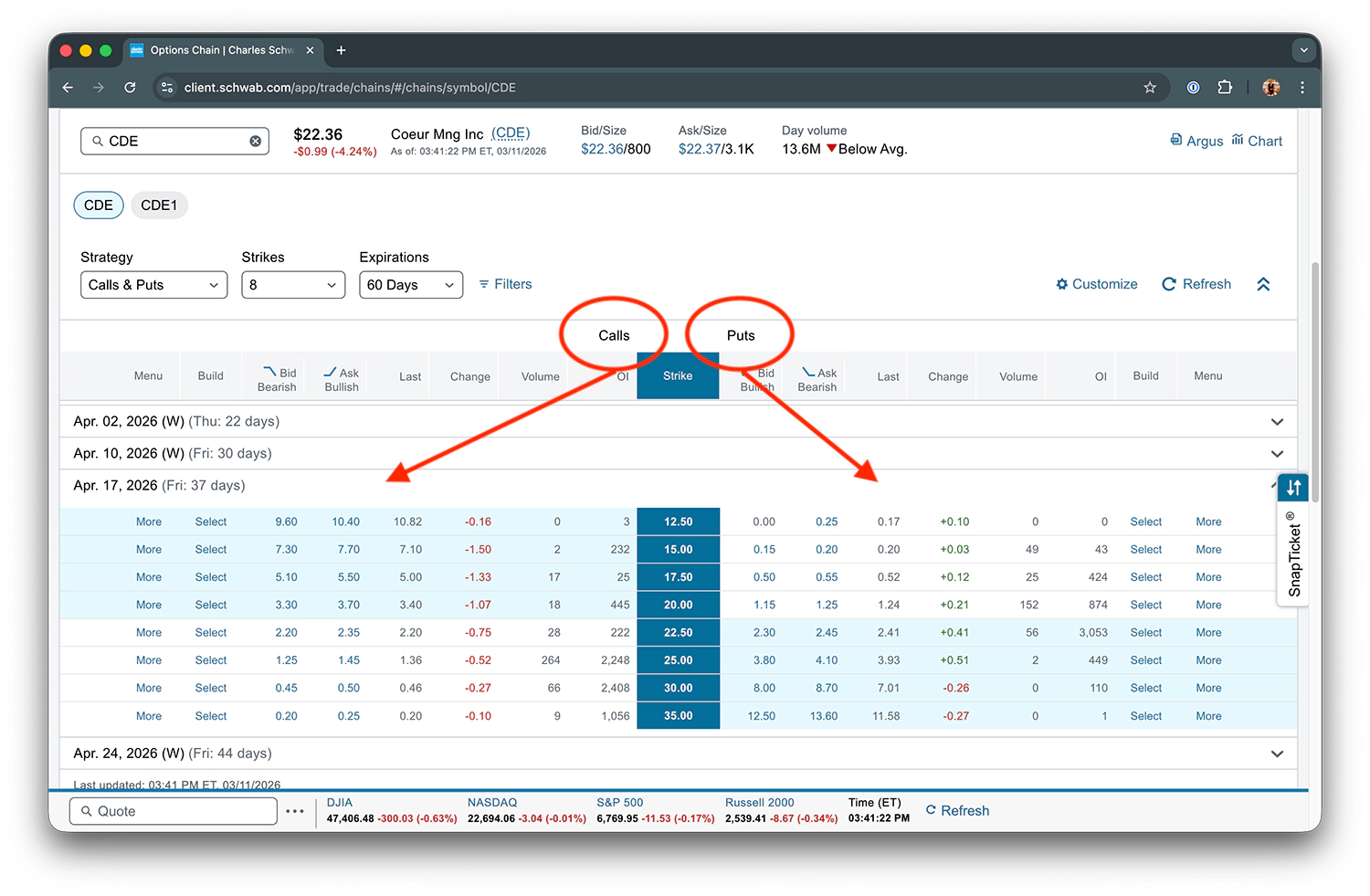
This is an options chain.
It’s the table your brokerage displays showing all available options contracts for a given stock.
This screenshot is from my Schwab account. If you use a different broker (Fidelity, TD Ameritrade, Tastytrade, Interactive Brokers), your screen will look different, but the core information is identical. The columns and data are universal. Only the arrangement changes.
Here’s a high-level overview of the layout:
- Calls on the left
- Puts on the right
- Strike prices down the middle
- Each row is a different strike price
- Each column contains a piece of data about that contract
The chain lets you compare every available contract at a glance so you can find the one that matches your outlook and risk tolerance.
How to Read Every Column in the Options Chain
Let’s walk through each column left to right, using the screenshot above as our reference.
Note: I’m skipping Schwab-specific action columns (Build, Menu) because those are platform-specific. The columns below are what you’ll find in every brokerage.
Strike
The strike price is the price at which you can buy (call) or sell (put) the underlying stock if the option is exercised.
The chain lists multiple strikes. Each row is a different strike price.
The strike column is your anchor.
Everything else in that row describes the contract at that specific strike.
Bid and Ask
- The bid is the highest price a buyer is currently willing to pay for this contract. If you’re selling an option, the bid is the price you’ll receive.
- The ask is the lowest price a seller is currently willing to accept. If you’re buying an option, the ask is the price you’ll pay.
- The gap between the bid and ask is the bid-ask spread (a measure of liquidity). Tighter spread equals more liquid, easier to get a fair price.
I go deeper on this in Understanding Bid-Ask Spreads and Options Liquidity.
Last and Change
What about the “Last” column? That’s the price at which the most recent trade occurred.
It’s not the same as the current bid or ask. It’s historical, showing what someone actually paid or received last.
This can be misleading on low-volume options where the last trade may have happened hours or days ago.
Always prioritize bid/ask over last when evaluating a contract.
Change is how much the option’s price has moved since the previous close. Quick directional indicator, nothing more.
Volume and Open Interest (OI)
Volume is the number of contracts traded today for this specific strike and expiration.
Open interest (OI) is the total number of contracts currently outstanding for this specific strike and expiration.
These get their own deep dive below. For now, just know where they live in the chain.
Putting It All Together
Let’s read a single row from the screenshot.
Look at the $22.50 strike call:
- Bid: $2.20
- Ask: $2.35
- Last: $2.20
- Change: -$0.75
- Volume: 28
- OI: 222
This one row gives you everything you need to evaluate this contract, including its price, liquidity, recent activity.
- You know what someone will pay you to sell it ($2.20)
- You know what it costs to buy it ($2.35)
- You know it traded 28 times today and has 222 open contracts
That’s the entire options chain, decoded.
(Not so intimidating once someone walks you through it.)
How to Read Calls vs. Puts in the Options Chain
Take another look at the options chain screenshot above.
Calls are on the left. Puts are on the right. Strike prices sit in the center column (highlighted in blue on Schwab).
Both sides have the exact same columns:
- Bid
- Ask
- Last
- Change
- Volume
- OI
They mirror each other across the strike column.
Same Strike, Both Sides
Compare the $22.50 strike on both sides:
| Column | $22.50 Call | $22.50 Put |
|---|---|---|
| Bid | $2.20 | $2.30 |
| Ask | $2.35 | $2.45 |
| Last | $2.20 | $2.41 |
| Change | -$0.75 | +$0.41 |
| Volume | 28 | 56 |
| OI | 222 | 3,053 |
Same strike, different prices, because they represent different rights/obligations.
Notice the OI difference: 222 on the call side vs. 3,053 on the put side.
Much more open interest on the puts at this strike.
That tells you where traders are positioning. It doesn’t tell you why (they could be hedging, speculating, or selling premium), but it tells you where the action is.
How Moneyness Flips Between Calls and Puts
The same strike can be ITM for one side and OTM for the other.
With CDE at ~$22:
- The $20 strike is ITM for calls (stock is above the strike) but OTM for puts (stock is above the strike)
- The $25 strike is OTM for calls (stock is below the strike) but ITM for puts (strike is above the stock price)
This is why your brokerage shades certain rows. In the screenshot:
- Calls side: Strikes below ~$22 are shaded (ITM)
- Puts side: Strikes above ~$22 are shaded (ITM)
The shading flips from one side to the other. Once you see this pattern, reading the chain clicks.
What Are Volume and Open Interest (and Why Do They Matter)?
You’ve seen where volume and OI live in the chain. Now let’s talk about why these two numbers matter more than most beginners realize.
Volume (How Many Contracts Traded Today)
Volume resets to zero every trading day.
High volume means active trading. People are buying and selling this contract right now.
Low volume means few (or no) trades have happened today. You may have trouble getting filled at the price you want.
Open Interest (How Many Contracts Are Currently Outstanding)
OI does not reset daily. It’s a running total of all open positions.
- OI increases when a new buyer and a new seller create a contract together
- OI decreases when an existing holder closes their position
High OI means there’s an established market for this contract. Many traders have open positions at this strike and expiration.
Why Volume and Open Interest Tell You About Liquidity
These two numbers tell you whether you can get in and out of a trade at a fair price.
The pattern:
- Low volume + low OI = wide bid-ask spreads (you pay more to enter, receive less to exit)
- High volume + high OI = tight bid-ask spreads (trade closer to the “true” value of the contract)
There are no hard thresholds for what counts as “good” volume or OI.
Mega-cap stocks like NVDA or MSFT will have thousands to tens of thousands of contracts at popular strikes.
A smaller stock like CDE will naturally have lower numbers.
That said, it’s the relative context that matters, not a magic number. Compare volume and OI across strikes within the same chain to see which contracts are actively traded vs. which are ghost towns.
Volume and Open Interest as Market Sentiment Signals
Where volume and OI cluster tells you where other traders are positioning.
Heavy OI at a particular strike may indicate a level traders view as significant (support, resistance, or a popular target).
Don’t over-read this. It’s one data point, not a crystal ball. But it’s worth noticing patterns over time.
Liquid vs. Illiquid (A Side-by-Side Comparison)
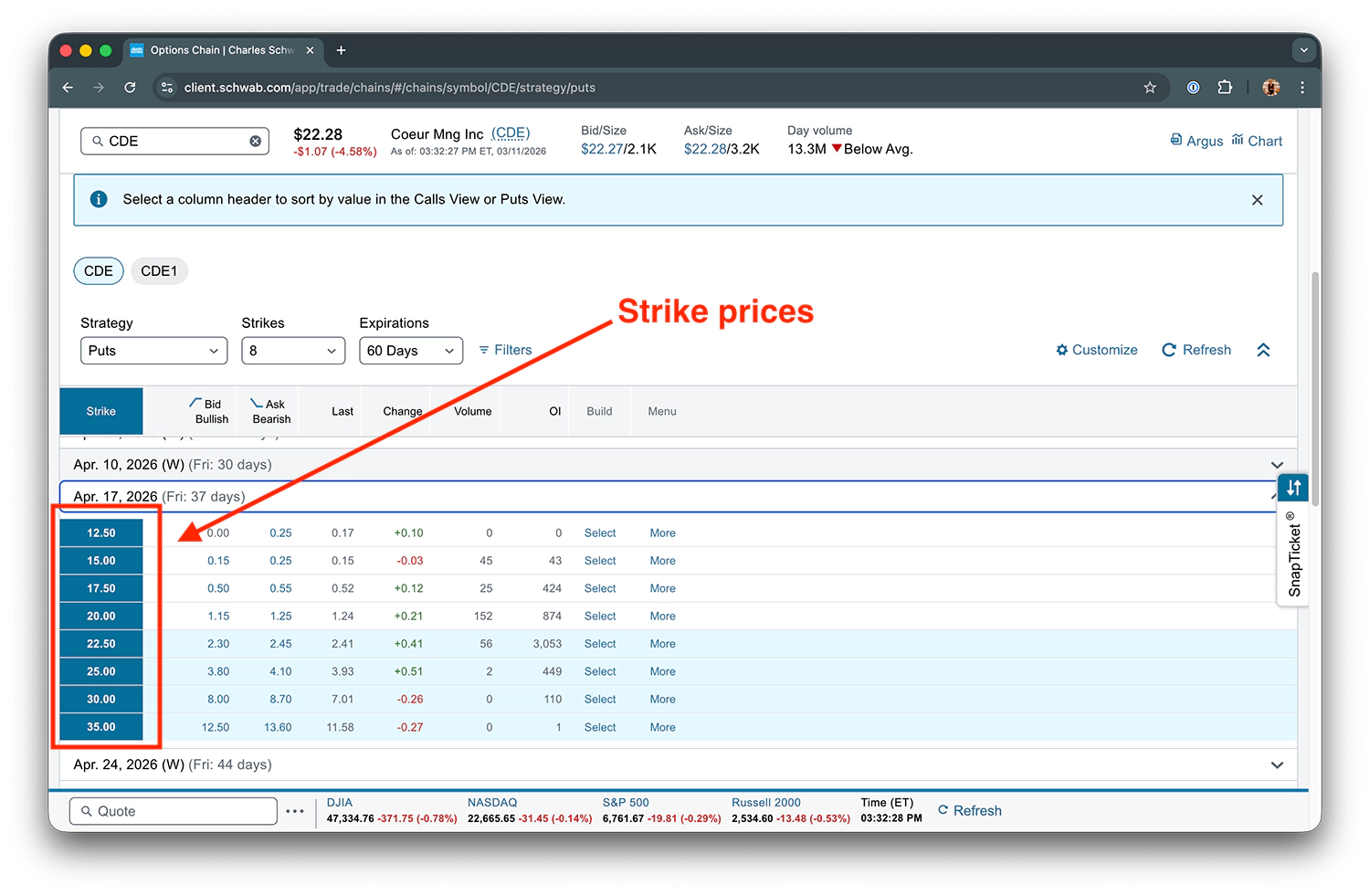
This is where the concept clicks for most people.
Here’s the puts side of the CDE chain for the Apr 17 expiration. Compare two strikes:
| Column | $20.00 Put (Liquid) | $12.50 Put (Illiquid) |
|---|---|---|
| Bid | $1.15 | $0.00 |
| Ask | $1.25 | $0.25 |
| Spread | $0.10 | $0.25 (the entire ask price) |
| Last | $1.24 | $0.17 |
| Change | +$0.21 | +$0.10 |
| Volume | 152 | 0 |
| OI | 874 | 0 |
The $20 strike has volume of 152 and OI of 874. This appears to be an actively traded contract, with a tight $0.10 bid-ask spread.
Now look at the $12.50 strike: volume is 0, OI is 0, and the spread widens to $0.25 (which is the entire ask price).
Nobody is trading this contract. If you tried to sell it, there’s literally no buyer on the other side. The bid is $0.00.
Same stock.
Same expiration.
Wildly different ability to actually trade the contract.
How to Select an Expiration Date in the Options Chain
We covered weekly vs. monthly vs. LEAPS expirations in Understanding Options Contracts: Strike, Expiration, Premium.
Here’s the short version:
- Longer expirations (more DTE) equals more premium, but more time for the trade to move against you
- Shorter expirations (less DTE) equal less premium, but shorter exposure window
- For Wheel Strategy traders, 30-45 DTE is a common starting point where theta decay accelerates
- Some traders prefer 7-15 DTE for quicker turnover
So how do you actually find and navigate expirations in the chain?
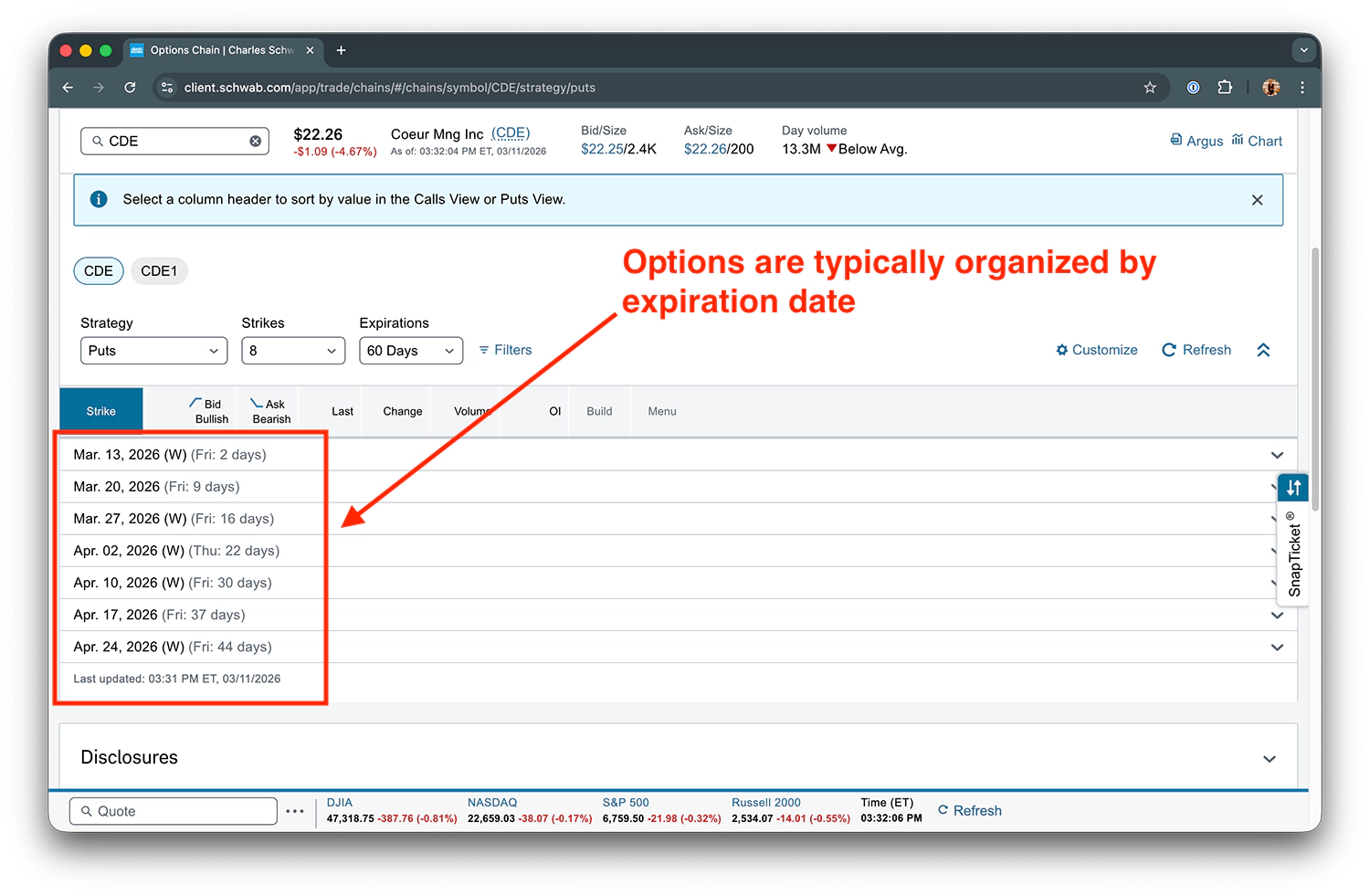
The chain groups contracts by expiration. Each expiration is a collapsible section showing all available strikes for that date.
The DTE number tells you how many calendar days remain until that expiration.
For example, “Fri: 37 days” means 37 calendar days until the contract expires on that Friday.
Your brokerage may display expirations differently (tabs, dropdown, calendar) but the same information is there.
How to Use the Options Chain for the Wheel Strategy
Reading the chain is step one of the trade process, not the whole process.
You’re scanning and evaluating. You are not ready to pull the trigger yet.
Delta, implied volatility, and historical volatility still need to be factored in before entering a trade. But chain reading is where every trade begins.
Let me show you exactly how I’d scan for a cash-secured put.
Scanning the Chain for a Cash-Secured Put
Above is the puts chain for CDE again for reference.
If I wanted to sell a CSP on CDE right now, here’s how I’d read this chain:
- Step 1: Pick an expiration: I’m looking for 30-45 DTE, so I’d expand the Apr 17 expiration (37 days).
- Step 2: Find the OTM put strikes: These are strikes below the current stock price (~$22), where I’d be comfortable owning the stock if assigned.
- Step 3: Check the premium: At the $20 strike, the bid is $1.15 ($115 per contract). I ask myself, “Is $115 worth the obligation to buy 100 shares at $20 ($2,000 commitment)?”
- Step 4: Check volume and OI: At the $20 strike, volume is 152 and OI is 874, with a tight $0.10 bid-ask spread. Fair fill territory.
- Step 5: Pause: This is where chain reading ends and deeper analysis begins. I still need to evaluate delta (what’s my probability of assignment?) and IV vs. HV (is the premium rich or cheap relative to expected movement?)
Each of those gets its own guide: the probability of assignment, whether the premium is rich or cheap, and how IV compares to historical volatility.
Step 5 is the most important step. The chain gives you the raw data. Delta and IV give you the analytical framework to decide whether to act on it.
Here’s a quick-reference checklist for scanning the chain for a CSP:
- ✅ Expiration: 30-45 DTE (or your preferred range)
- ✅ Strike: OTM, at a price you’re willing to own the stock
- ✅ Premium: Bid high enough to justify the obligation
- ✅ Volume/OI: Sufficient liquidity for a fair fill
- ✅ Then: Evaluate delta and IV/HV before entering (covered in dedicated articles)
Covered Calls (The Other Side of the Wheel)
Once you’re assigned on a CSP and own the shares, you sell covered calls. The chain reading process is the same, just flipped.
Now you’re looking at the calls side of the chain, scanning OTM strikes above the current price.
You want a strike above your cost basis so if called away, you sell at a profit.
Same checklist applies: expiration, strike, premium, volume/OI, then delta and IV/HV.
Covered calls get their own dedicated articles, but the chain mechanics you just learned transfer directly.
Where to Go from Here
You can now:
- Open an options chain and know exactly what you’re looking at
- Read every column in the chain, including strike, bid, ask, last, change, volume, open interest
- Compare calls vs. puts side by side and understand how moneyness flips between them
- Assess liquidity by checking volume and OI before entering a trade
- Identify the contract you want and evaluate whether it’s worth trading
Reading the chain is the foundation for every trade you’ll make when running The Wheel Strategy.
Your next step is the forces that move option prices, and you can always work back through the complete options fundamentals path for the full sequence.
Now you know what every column means, how to compare calls and puts, how to spot liquidity (and avoid the dead zones), and how to start scanning for real trades.
Every trade you’ll ever place starts with reading this screen. You just learned how.