 by
by 
Entering a cash secured put means placing a sell-to-open (STO) limit order on an out-of-the-money put option through your broker’s options chain.
Once you’re familiar with your broker’s user interface, the entire process takes less than 60 seconds.
The hard part is everything that comes before this moment. Screening stocks, filtering strikes, checking delta and IV.
If you’ve done that work, entering the trade is the easy part.
I’ve entered hundreds of CSP positions at this point. The first one felt like defusing a bomb. By the third or fourth, it was muscle memory.
Let’s make your first one feel like your fifth.
Entering the trade is one step in the bigger process, which I lay out in Cash Secured Puts (CSPs): The Complete Guide.
Table Of Contents
What You Should Have Ready Before Entering a CSP Trade
This article assumes you’ve already:
- Screened for a stock you want to sell a CSP one
- Screened the options chain for that particular stock
- Selected a candidate at a strike price you wouldn’t mind owning the stock at
How to Screen and Filter Cash Secured Puts for The Wheel Strategy walks through each of them.
Entering a trade without a screened candidate is just gambling with extra steps.
Your screening process should have produced, at a minimum, four components:
- Ticker
- Strike price
- Expiration date
- Premium target
For the sake of this tutorial, here is the strike stock I’ll be using as an example:
- Ticker:
CRDO - Strike: $85.00
- Expiration: 05/15/2026 (38 DTE)
- Delta: -0.2120
- IV: 87.1065
- Ask: $4.20
A daily bar chart for CRDO can be found below:
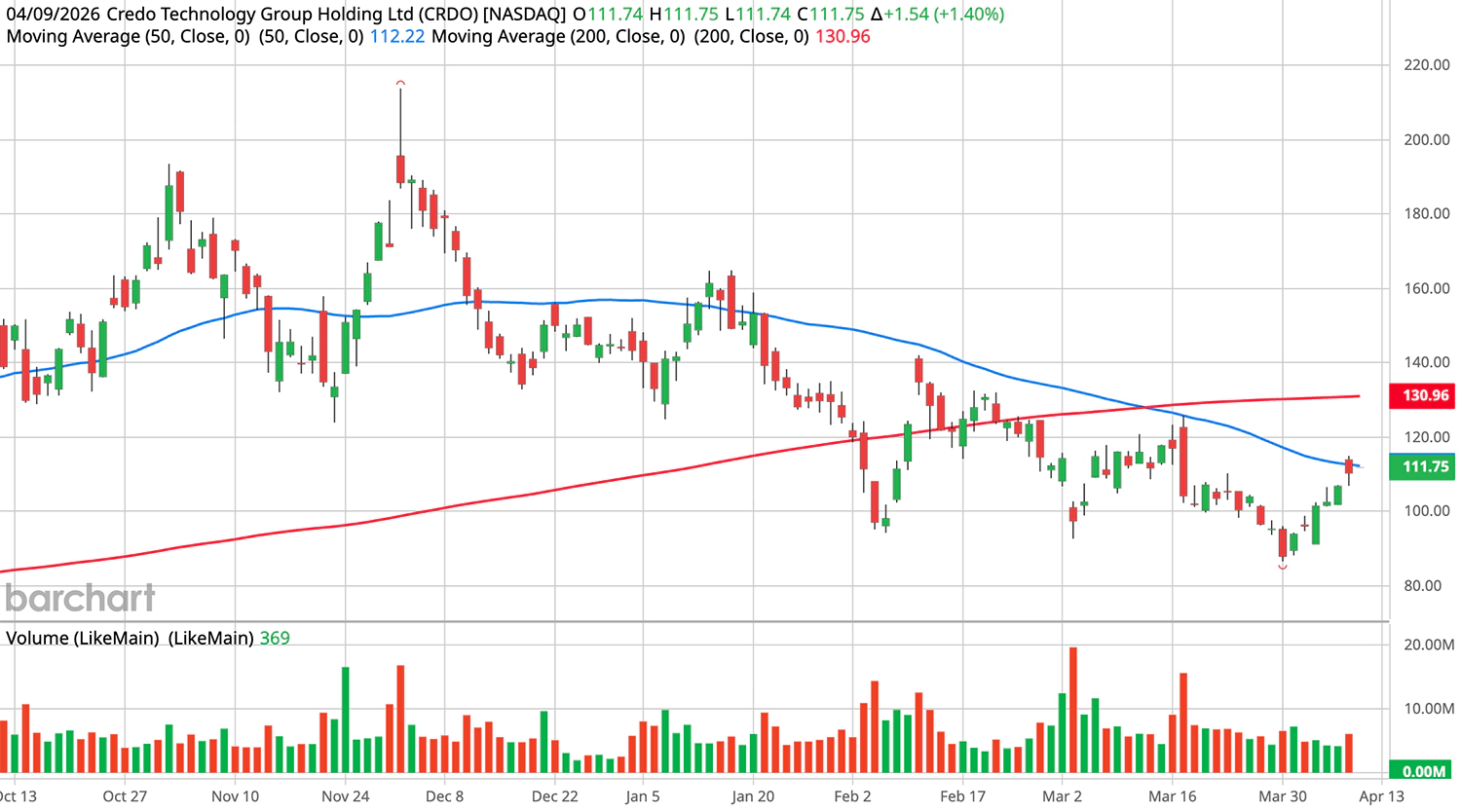
Take a glance at it so you can understand its price action.
Note: I’m using Schwab for the screenshots, but the principles are identical regardless of whether you use Fidelity, Robinhood, IBKR, or any other broker. The fields and terminology are the same.
How to Confirm Your Thesis Before Placing a Trade
Before you place a single order, run through this checklist:
- Confirm your thesis on the underlying hasn’t changed (no breaking news, downgrade, sector collapse, etc.)
- Verify premium and annual yield still meet your threshold
- Verify delta is within your tolerance range (0.2-0.3 for the approach in this article)
- Re-check that earnings aren’t now inside your DTE window (dates shift)
- Verify bid-ask spread is still reasonable (liquidity hasn’t dried up)
Could you skip these steps? Sure.
Will you regret it when you realize the stock just got downgraded and you’re selling puts into a free fall? Absolutely.
If CRDO gapped down 5% overnight, your $85 strike that was safely OTM might now be ATM or even ITM. That changes the entire risk profile of the trade.
This checklist is the difference between a disciplined trader and a reactive one.
It takes 60 seconds. Do it every time.
Why You Should Always Use Limit Orders When Selling Puts

Here’s a quick refresher on the two order types that matter here:
- Market order: Fills immediately at whatever price is available
- Limit order: Fills only at your specified price or better
Always use limit orders when selling cash secured puts. No exceptions.
This matters even more for options than it does for stocks. Options have wider bid-ask spreads, less liquidity, and fewer participants. A market order on an option can fill at a meaningfully worse price than you expected.
With CRDO showing a bid of $3.90 and an ask of $4.20, a market order might fill anywhere in that range.
A limit order at $4.20 means you’re saying:
“I’ll sell this put, but only if I get at least $4.20 per share in premium.”
Since you’re the seller, your goal is to maximize the premium you collect.
Start at the ask price (the highest price a buyer is currently offering) and wait 5-10 minutes for a fill. If it doesn’t fill, you’ll adjust (more on that below).
Day Orders vs. GTC Orders for Cash Secured Puts
There are two order durations to know:
- DAY: Expires at market close. Use for opening new positions.
- GTC (Good ‘Til Canceled): Stays active until filled or manually canceled. Use for profit-taking orders.
Use “DAY” orders to open. Use “GTC” orders to close.
Why DAY for opening? Market conditions change overnight. You want to re-evaluate tomorrow with fresh data, not get auto-filled on stale logic at 9:31 AM.
Why GTC for profit-taking? Set-and-forget. You want that buy-to-close order sitting there, waiting for your profit target to hit while you’re doing literally anything else.
Note: There’s more than one way to take those profits. I cover three separate partial profit techniques inside how to take partial profits on cash secured puts.
How to Navigate the Options Chain and Find Your Contract
Keep in mind that your screener may be working with delayed market data.
Maybe by minutes.
Maybe by hours.
In either case, it’s highly unlikely that your options screener is fully real-time.
Therefore, before you entry a trade, you need to double and triple check your brokerage’s option chain matches (or is close to) what your screener reported.
Effectively, the options chain shows what’s real right now.
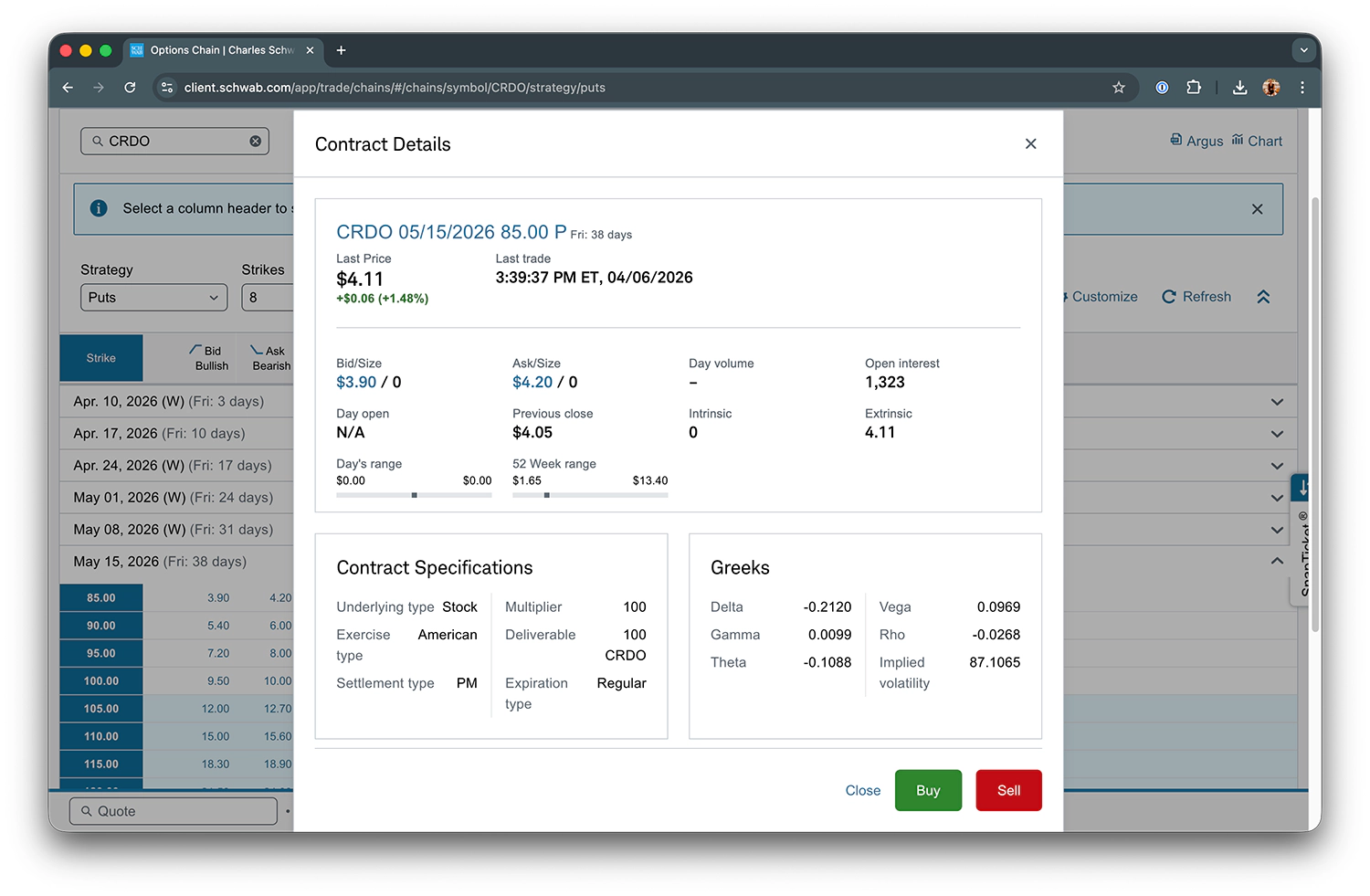
This is the CRDO 05/15/2026 $85 put on the options chain. Here’s what to verify before proceeding:
- Last: $4.11 (most recent trade price)
- Bid: $3.90 (highest price a buyer will pay right now)
- Ask: $4.20 (lowest price a seller will accept right now)
- Delta: -0.2120 (probability/sensitivity metric)
- Theta: -0.1088 (daily time decay)
- IV: 87.1065 (implied volatility)
If any of these numbers have drifted meaningfully from what your screener showed, pause and re-evaluate.
A 5% shift in IV or a delta that jumped from -0.21 to -0.35 means the trade changed. The chain is your last sanity check before committing capital.
For a full walkthrough of every column on the options chain, see How to Read an Options Chain.
How to Place a Sell-to-Open (STO) Order on a Cash Secured Put
This is where it happens. One order ticket, five fields, and you’re in.
But first, the most important distinction in this entire article.
STO vs. BTO (Read This Before You Click Anything)
Sell to Open (STO) creates a new short put position. You collect premium.
Buy to Open (BTO) creates a new long put position. You pay premium.
If you accidentally Buy to Open this CRDO put at $4.20, you just paid $420 instead of collecting $420. That’s an $840 swing in the wrong direction.
(Hint: The broker won’t care if you made a mistake.)
This is one of those mistakes you only make once. Make it on paper, not with real money.
In Schwab’s interface, you’ll find the link to STO under “More” and then “Sell Option”:
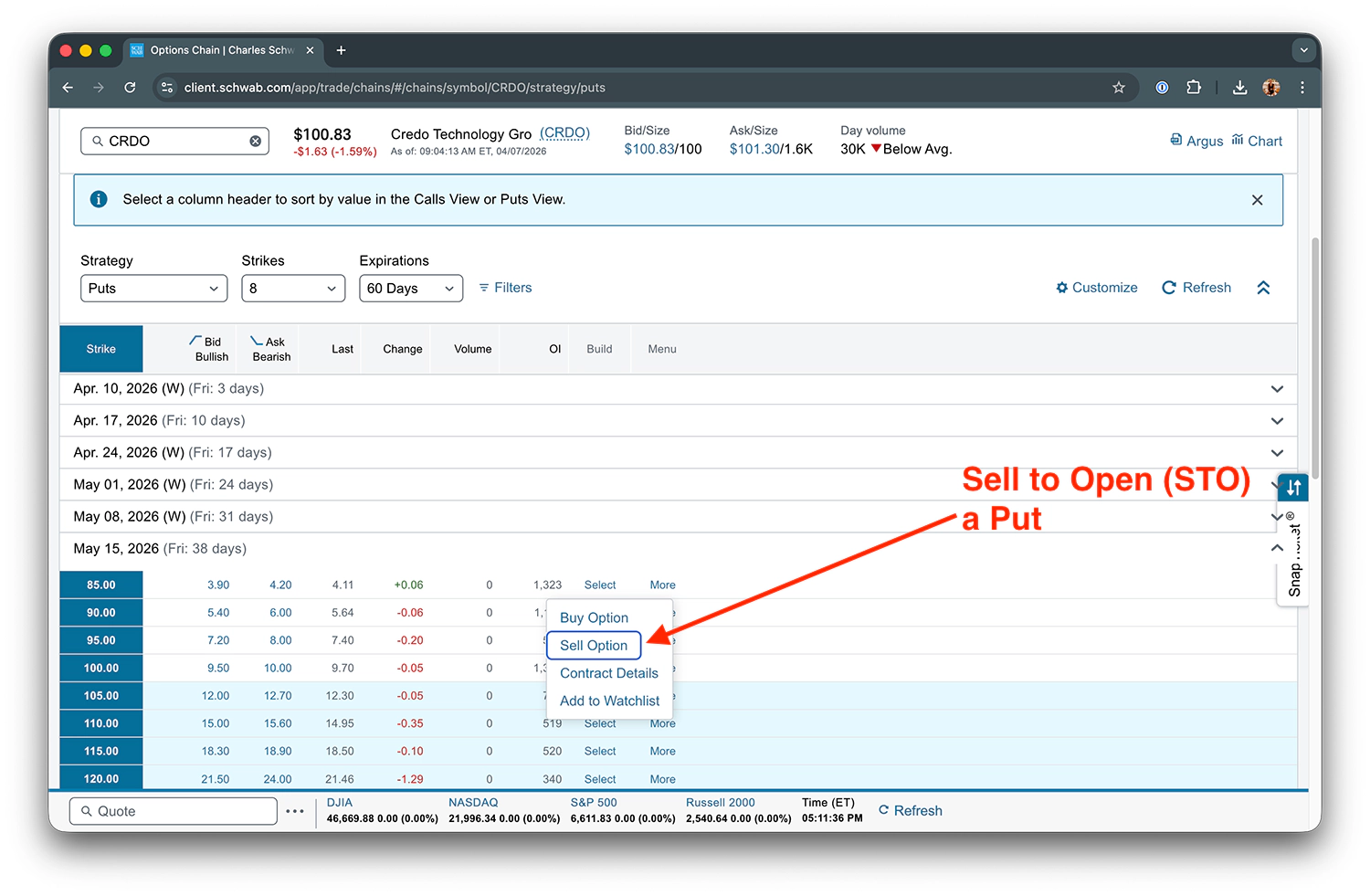
Click that, and you’ll get the order ticket.
Filling Out the Order Ticket
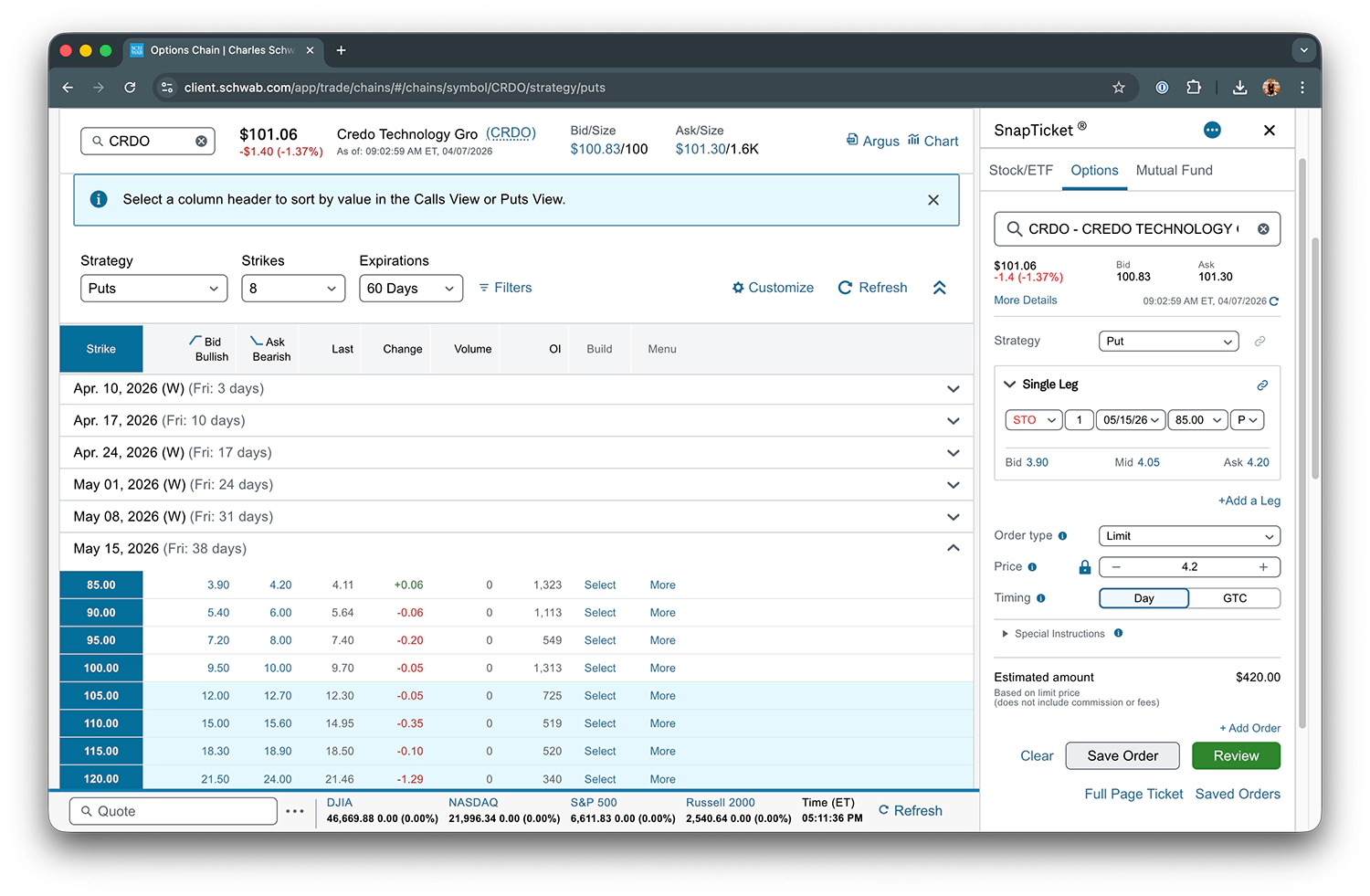
Here’s what each field should look like for the CRDO trade:
- Action: Sell to Open (STO)
- Option Type: Put
- Strike: $85.00
- Expiration: 05/15/2026
- Order Type: Limit
- Limit Price: $4.20 (the ask)
- Duration: Day
- Estimated Credit: $420.00 (1 contract x $4.20 x 100 shares)
That’s what a correctly filled order ticket looks like.
Every field matters. But Action (STO) and Order Type (Limit) are the two that will cost you the most money if you get them wrong.
How to Size Your Cash Secured Put Position
Position sizing is a risk management topic that deserves its own deep dive.
For now, here’s the rule of thumb I follow:
- 5% of portfolio: Low conviction
- 10-15% of portfolio: Standard conviction
- 15-20% of portfolio: High conviction
- Hard cap: 20% per position, no exceptions
For this CRDO $85 strike, you need $8,500 in cash per contract (100 shares x $85).
In a $50K portfolio, one contract uses $8,500. That’s about 17% of your portfolio, so you’d be near the upper end of standard conviction/low end of high conviction.
For deeper coverage of position sizing and portfolio-level allocation, see The Wheel Strategy: The Complete Guide.
The Confirmation Screen (Your Last Chance to Double-Check)
Every broker shows a confirmation screen before executing your order.
Read every field. Contract, direction (STO, not BTO), quantity, limit price, order duration.
If something looks off, cancel and start over. There’s no rush. The option chain isn’t going anywhere.
(Five seconds of reading now saves you five days, five weeks, or five months of regret later.)
What to Do After Your Cash Secured Put Order Fills
Assume the order filled. Premium is credited to your account. Now what?
Your post-fill routine should take less than 10 minutes and should look something like the following:
- Confirm the fill executed at your limit price or better
- Log the trade in your journal:
- Ticker
- Strike
- Expiration
- Premium collected
- Delta at entry
- IV at entry
- Why you picked this stock
- Current market conditions
- Immediately set a GTC buy-to-close order at your profit target
- Move on (don’t stare at the position)
Step 3 is non-negotiable. Set the GTC order before you close the browser.
My standard profit target is 80% of premium collected.
For the CRDO trade:
- Premium collected: $4.20 per share
- 80% of $4.20 = $3.36 (your profit target)
- GTC buy-to-close price: $4.20 - $3.36 = $0.84 per share
If 50% profit appears in 24-48 hours, consider taking it early. A super fast 50% is better than a slow 70% that turns into a loss.
Otherwise, ride the trade with confidence.
What to Do If Your Cash Secured Put Order Doesn’t Fill
Your order is sitting there. No fill.
What’s going on?
This isn’t a race. The option isn’t going anywhere.
Give it time:
- Highly liquid options: 5 minutes
- Less liquid options: 10-15 minutes
If still no fill, adjust your limit price. Split the difference between your current limit and the mid price.
For CRDO, the ask is $4.20 and the mid is approximately $4.05. If your $4.20 limit isn’t filling, try $4.12 or $4.10.
Never jump straight to the bid. That’s leaving money on the table.
If you’re properly screening for liquidity, you can likely adjust in $0.05-$0.10 increments toward the mid. Keep adjusting until you hit your minimum acceptable premium.
Why the Mid Price Moves Against You (and What to Do About It)
The mid price is not a fixed number. It’s a moving equilibrium.
Both sides (buyers and sellers) are constantly updating their prices. And market makers, the firms on the other side of most of your trades, are not passive participants.
When they see you repeatedly lowering your limit with no urgency from buyers, they infer something:
“This seller is motivated. I can lower my bid.”
They drop bids. Which lowers the mid. Which makes you think you need to lower your price further.
It’s a feedback loop, and the market maker wins.
Most traders treat the mid price like it’s carved in stone. It’s not. It’s more like a suggestion that the market makers can revise whenever they feel like it.
The mid can be a ghost price (a theoretical number that doesn’t reflect where real trades happen). True executable price is closer to where liquidity exists, not the mathematical midpoint between two quotes.
If the mid keeps slipping away from you, here are your three options:
- Accept the lower premium if it still meets your annual yield threshold
- Wait for a volatility spike or price movement to reset the spread
- Set your price and walk away — either you get filled by end of day, or the order expires and you re-evaluate tomorrow
For a deeper dive on bid-ask dynamics and how market makers operate, see Understanding Bid-Ask Spreads and Options Liquidity.
Note: Option 3 is the most underrated. Setting your price and walking away removes you from the feedback loop entirely. Market makers can’t chase a seller who isn’t watching.
Entering a CSP Becomes Second Nature After a Few Trades
The first time you enter a cash secured put, it can feel overwhelming.
Menus, fields, order types, confirmation screens.
By the third trade, you won’t even think about it.
The process is the same every time:
- Confirm your thesis
- Open the chain
- Verify the numbers
- STO limit order at the ask
- Set your profit target, move on
Screening is the intellectual work. Entering is the mechanical work.
Once the mechanics become muscle memory, you get to focus on what matters: finding great trades and managing risk.